Deputy
Time & attendance + award interpretationRosters, timesheet approvals, pay conditions and award interpretation. Check ordinary hours, overtime, penalties and allowances before exporting data to payroll.
Explore DeputyAU Payroll Job-Ready Program
Build practical Australian payroll capability through a fictional company, realistic payroll scenarios and structured checks.
Designed for Filipino professionals with accounting, HR or business backgrounds who want to turn their existing skills into payroll capability.
Ask about the programFrom inputs to insight
Follow the work across time and attendance, payroll, Excel verification and accounting. Learn to spot issues, ask the right questions and document a clear path to resolution.
Course format, system access, dates and fees will be confirmed as the program develops.
Explore each category for the skills and practice involved.
Understand the Australian payroll landscape: employee types, the National Employment Standards, awards and enterprise agreements, pay cycles and payroll records.
Practise: build an employee setup checklist and identify the information needed before the first pay run.
Read and validate timesheets, identify ordinary hours, overtime, penalties, breaks, RDOs and allowances, and check the applicable award or agreement.
Practise: investigate missing hours, additional shifts and incorrect pay categories.
Understand PAYG withholding, superannuation treatment and Single Touch Payroll categories, including how different payments flow through payroll reporting.
Practise: classify payments, review deductions and compare payroll totals with reporting outputs.
Bring employee changes, timesheets, leave and adjustments into a pay run. Use structured checks before progressing to review and approval.
Practise: process a fictional pay cycle, correct late or changed timesheets and explain the adjustments.
Use Excel, pivot tables and payroll reports to reconcile hours and pay, identify unusual movements and trace discrepancies back to source records.
Practise: investigate an overpayment, document the cause and recommend a control.
Learn how time and attendance, payroll processing and accounting fit together. Develop habits for checking data at each handover.
Practise: follow the workflow from an approved timesheet to payroll verification and the accounting reconciliation.
Prepare and reconcile the information used for payroll-related returns, with attention to scheme coverage, reporting periods, review and supporting records.
Practise: prepare sample payroll tax, MyLeave and QLeave return data, and build a lodgement checklist.
Apply the learning to a fictional company, explain your decisions and improve your work through review and feedback.
Practise: complete a pay-run case study with supporting reconciliations, exception notes and a clear handover.
Systems in focus
Rosters, timesheet approvals, pay conditions and award interpretation. Check ordinary hours, overtime, penalties and allowances before exporting data to payroll.
Explore DeputyEmployee setup, timesheet inputs, leave, adjustments, payroll reports and pay-run verification. Understand how payroll outputs support STP reporting and accounting journals.
Employment Hero resourcesExplore payroll workflows and the accounting side of the cycle: payroll journals, account mapping, wage and liability balances, and bank reconciliation.
Explore Xero PayrollLearn to prepare accurate source data, reconcile a return and retain the evidence behind it. Coverage and requirements depend on the employer’s state, industry and applicable scheme.
Taxable wage categories, state and territory requirements, grouping concepts, monthly returns and annual reconciliation preparation.
Payroll Tax AustraliaConstruction portable long service leave: eligible worker records, service and ordinary pay data, contribution reconciliation and quarterly return preparation.
MyLeave employer informationPortable long service leave: identify the applicable scheme, check eligible workers and service records, and prepare the relevant employer return.
QLeave employer informationPayroll scenarios and learning graphics shared by SESAY on LinkedIn. Open any image to view the detail.
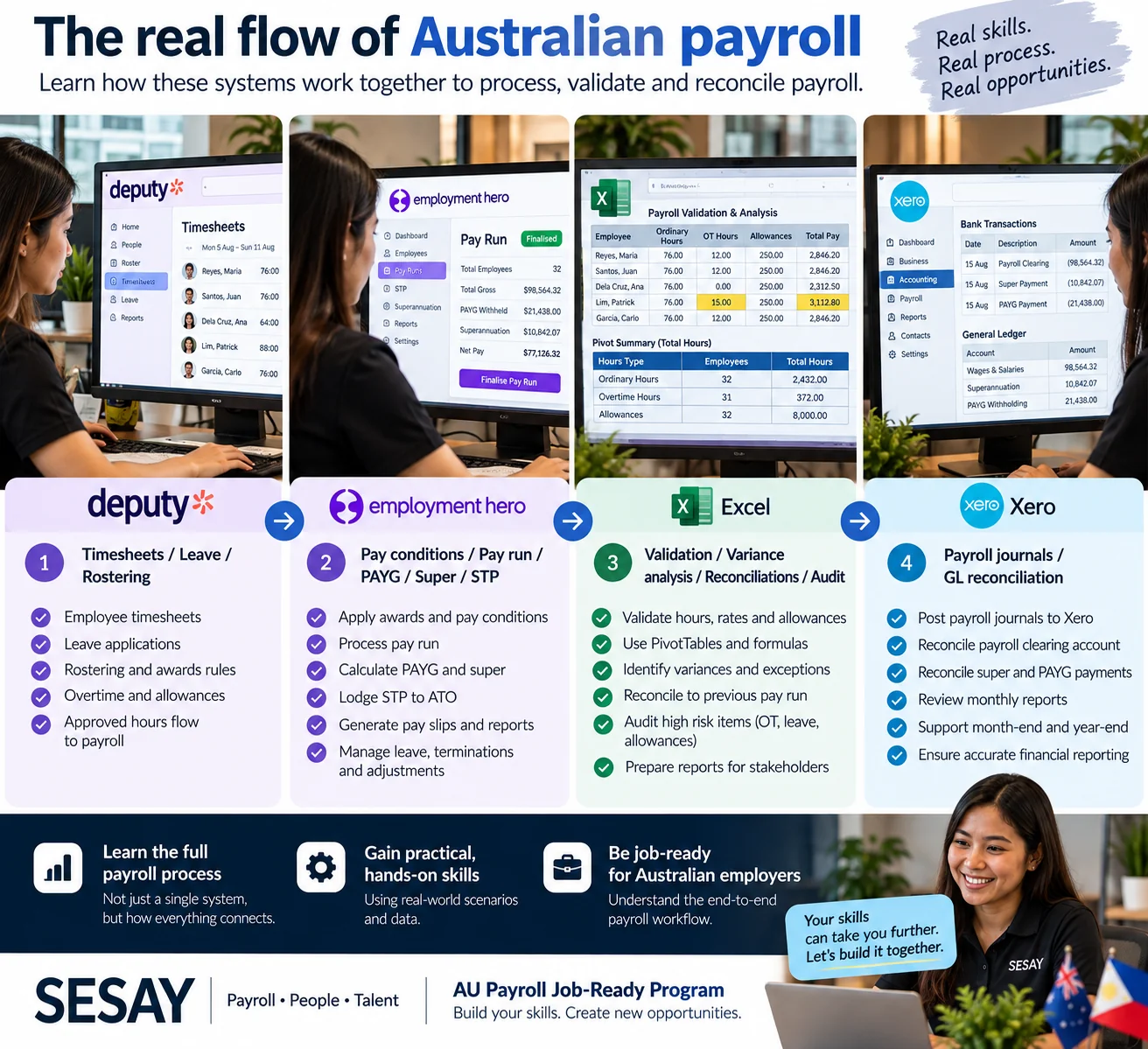
See how timesheets, payroll processing, Excel checks and accounting reconciliation connect.
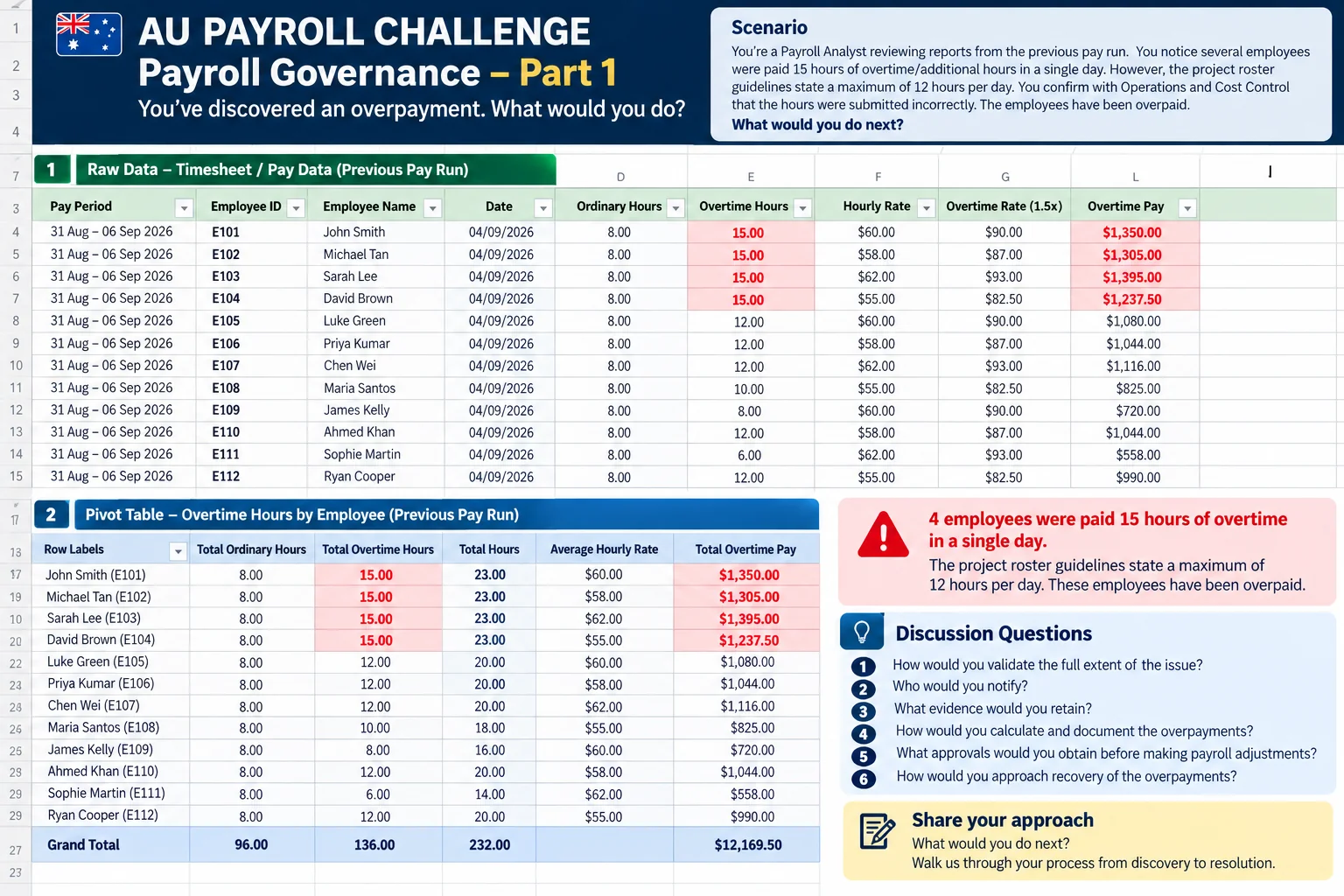
Use a fictional payroll dashboard to identify an overpayment and explain your checks.
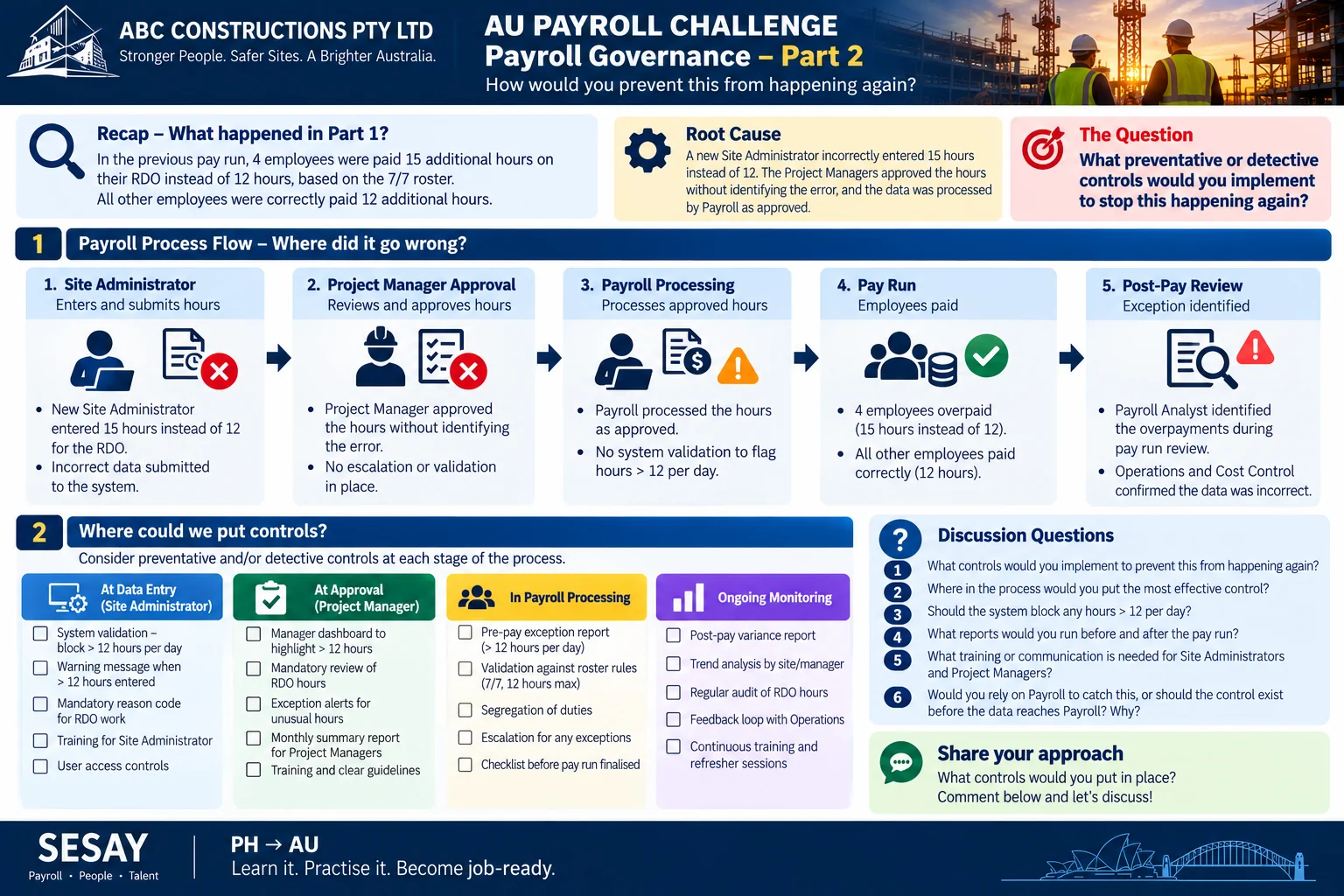
Look beyond the error to the approvals, checks and escalation points that could prevent it.

See how accuracy, reconciliations and working with data support a career in Australian payroll.
Program dates, fees and enrolment details are being developed. Contact SESAY to discuss your learning goals and express interest.
Email about the program